Chitra Tiny
A 212M-parameter English text-to-image model that makes 256×256 pictures from a sentence. Trained from scratch on about 4.7 million public-domain and CC0 images, it runs on a laptop in about three seconds per image.
Try it now · free, no login
Type a sentence. Get a picture.
Describe a whole scene for best results: say “a cat asleep on a sofa by a window” rather than just “cat”.
Try one of these
Best at photos, paintings, landscapes, buildings, vehicles and food. Weak at text in images, counting, several specific objects and faces. Free and without login, with a fair-use limit per visitor. Prompts are filtered and every image passes an open safety classifier before it is shown.
The result
Convincing scenes. Weak at composition.
Chitra Tiny makes convincing photos, paintings and scenes of the kind it saw often, and its pictures match their captions nearly as well as real photos do. It is weak at composing specific everyday objects, counts and positions, where it reaches about half of Stable Diffusion 1.5 on GenEval.
From noise to a picture
- 01
Read the prompt
A frozen open text encoder (Google’s Flan-T5-Base) turns the words into 77 vectors.
- 02
Start from noise
The picture begins as random numbers in a small compressed space. The seed picks which ones.
- 03
Remove the noise in 50 steps
The Chitra Tiny transformer, trained from scratch, moves the noise towards a picture that fits the text. Guidance pushes it further towards the prompt.
- 04
Turn it into pixels
A frozen open image decoder (Stability AI’s sd-vae-ft-mse) expands the result to 256×256.
The transformer that makes the picture started from random weights, with no weights from any other image model. The text encoder and decoder are existing open models, used unchanged.
“a lighthouse on a rocky coast at sunset”
The picture it made
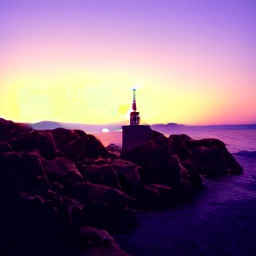
256×256, shown at its real resolution. seed 0 · guidance 7 · 50 steps.
More first tries
Seed 0, guidance 7, one run per prompt. Nothing was picked from several attempts.

an oil painting of a vase of flowers
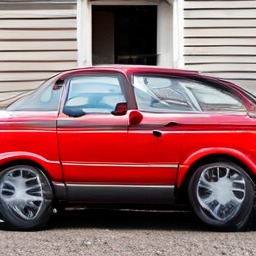
a red car parked in front of a house
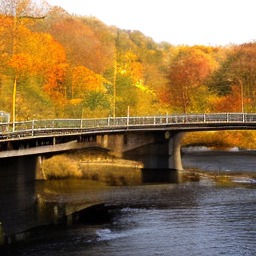
a bridge over a river in autumn
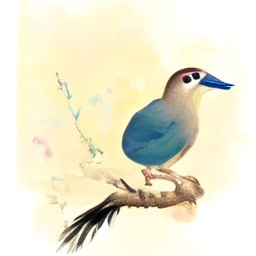
a watercolor painting of a bird on a branch
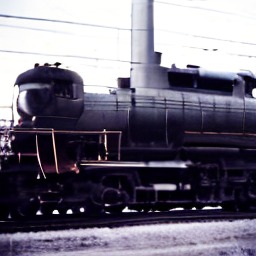
a steam locomotive at a railway station
The model
- Parameters
- 212M · diffusion transformer, 16 layers, width 768
- Method
- Latent rectified-flow diffusion with classifier-free guidance
- Initialization
- Random weights; trained from scratch
- Training data
- About 4.7 million public-domain and CC0 images with automatically generated captions
- Uses
- google/flan-t5-base (text encoder, Apache-2.0) and stabilityai/sd-vae-ft-mse (decoder, MIT), frozen
- Output
- 256×256, English prompts
- Licence
- Apache-2.0 (weights and code)
How to run it
The weights (0.85 GB) download from Hugging Face on first use, with no login. About three seconds per image on an Apple-silicon Mac; faster on an NVIDIA GPU; tens of seconds on a CPU.
git clone https://github.com/UdgamLabs/chitra-tiny
cd chitra-tiny && pip install -r requirements.txt
python chitra_tiny.py "a castle on a hill" --n 4

# from Python
from chitra_tiny import ChitraTiny
pipe = ChitraTiny.from_pretrained("UdgamLabs/Chitra-Tiny")
pipe("a bridge in autumn", n=4, seed=0)[0].save("bridge.png")

# local web playground
python app.py
How good is it
- FID, 5,000 held-out images (lower is better)
- 22.1
- Held-out images of the kind it was trained on; not comparable to FID on other datasets
- CLIP score, ViT-L/14 (higher is better)
- 26.2
- Real held-out images with their own captions score 27.5
- GenEval overall (higher is better)
- 0.219
- Stable Diffusion 1.5 scores 0.426 in the same harness
| Task | Chitra Tiny | Stable Diffusion 1.5 |
|---|---|---|
| Single object | 0.60 | 0.96 |
| Colours | 0.39 | 0.77 |
| Counting | 0.15 | 0.38 |
| Two objects | 0.10 | 0.37 |
| Colour attribution | 0.07 | 0.05 |
| Position | 0.01 | 0.04 |
| Overall | 0.219 | 0.426 |
Official GenEval code and prompts, 553 prompts × 4 images, 50 steps; Chitra Tiny at guidance 7. Our harness gave Stable Diffusion 1.5 0.426, against 0.43 published by the GenEval authors. Stable Diffusion 1.5 has about four times the parameters and was trained on far more images.
Where it does well
Photographs, paintings, landscapes, buildings, vehicles and food: the kinds of picture that fill public-domain collections. FID and CLIP use held-out images like its own training data, so they favour it.
Where it is behind
Everyday objects that are rare in its training images: at guidance 4, single-object accuracy is 0.85 for the most common third of GenEval’s objects and 0.33 for the rarest third. Two objects, counting and positions are weak.
Limitations
- Less common everyday objects, several objects in one picture, counting and positions.
- People, especially faces and hands, and writing text in images.
- 256×256 only, so fine detail is limited. English prompts only.
- No safety filter of its own. Add moderation for any public-facing use. Not for depicting real people or for news imagery.
- Its training images over-represent historic, Western and museum imagery; expect those biases.
Three things it gets wrong
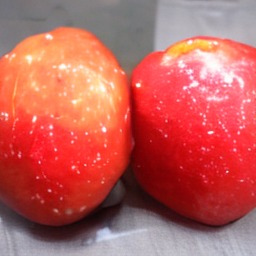
Counting
“three red apples on a table”
Two apples.
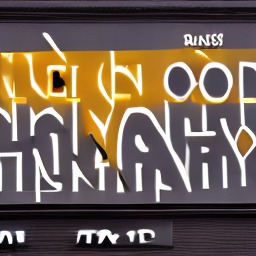
Text
“a shop sign that says OPEN”
Letter-like shapes, no word.
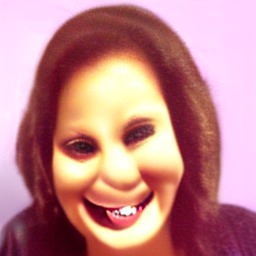
Faces
“a close-up photo of a smiling woman”
Distorted eyes and teeth.
Weights, code and the evaluation
- Hugging Face Space
The demo on Hugging Face
- Chitra-Tiny on Hugging Face
Weights, model card
- GitHub repository
Code, examples, checksums
- Visual walkthrough
Saved images, guidance and seeds explained
- Evaluation
FID, CLIP and GenEval in detail
- Runnable examples
Quickstart grid, guidance sweep
Weights and code are released under Apache-2.0. Training code and data are not part of this release.